
What happens when years of refining AI instructions meet a completely new way of working with AI?
In my previous post, I covered what Copilot Cowork is, how it works, and why the personalization model - personal instructions, memory, and custom skills - is what sets it apart. This post goes deeper into the skill format itself and the journey of translating years of GitHub Copilot instruction files into Copilot Cowork skills.
I have spent years building, iterating, and refining GitHub Copilot instruction files in Visual Studio Code. What started as a simple copilot-instructions.md file grew into a structured system of instruction files - covering everything from terminology and writing style to LinkedIn post formats and session abstract guidelines. These files became an essential part of how I work. They shaped how GitHub Copilot understood my preferences, my conventions, and my voice.
Then Microsoft Copilot Cowork arrived. And with it, a new concept: Agent Skills. Skills are not just instructions - they are portable, modular capabilities. An AI agent can discover them, load them on demand, and execute them across multiple tools. When I first looked at the skill format, I realized something: the hard work I had put into my instruction files was not wasted. It was a head start. The knowledge was already there - it just needed a new dialect.
What I did not expect was how much the relationship would go both ways. Building skills changed how I think about structuring knowledge for AI - from monolithic files to modular, task-driven components loaded on demand. And the skills themselves changed how Cowork behaves - shaping its voice, enforcing boundaries, and turning a general-purpose agent into one that works the way I do. This post is about both directions: how Cowork changed the way I work, and how I changed how Cowork behaves.
Copilot Cowork and custom skills - a quick recap
Microsoft Copilot Cowork is an agentic assistant within Microsoft 365 Copilot that carries out multi-step tasks on your behalf. It comes with 12 built-in skills and supports up to 50 custom skills that live in your personal Microsoft OneDrive. For the full introduction to Cowork - including prerequisites, the conversation model, approvals, the side panel, personal instructions, memory files, and getting started with custom skills - see my previous post.
The part that matters for this post is how custom skills differ from GitHub Copilot instruction files. Instruction files live in the repository and are scoped to the workspace. Cowork skills follow you across every conversation - regardless of which device or browser you use. And where instruction files are always loaded based on file patterns, skills use a progressive loading model that keeps context lean. That difference in activation model is what forced me to rethink how I structure knowledge for AI.
What are Agent Skills?
Agent Skills are an open standard for extending AI agent capabilities with specialized knowledge and workflows. At the core, a skill is a folder containing a SKILL.md file. This file includes metadata - at minimum a name and description - and instructions that tell the agent how to perform a specific task. Skills can also bundle scripts, reference materials, templates, and other resources in the same directory.
The folder structure of a typical skill looks like this:
 📂 my-skill/
  ├─ 📝 SKILL.md                 # Required: metadata + instructions
  ├─ 📂 references/              # Optional: supporting documentation
  |   ├─ 📝 terminology.md
  |   └─ 📝 templates.md
  ├─ 📂 scripts/                 # Optional: executable code the agent can run
  |   └─ 📄 validate.ps1
  └─ 📂 assets/                  # Optional: templates, images, data files
      └─ 📄 config-template.json
Agent Skill folder structure
Skills work through a three-stage loading process called progressive disclosure:
- Discovery - the agent reads only the
nameanddescriptionfrom the YAML frontmatter, just enough to know when the skill might be relevant - Activation - when a task matches a skill’s description, the agent reads the full
SKILL.mdinstructions into context - Execution - the agent follows the instructions, optionally loading referenced files or executing bundled scripts as needed
This means you can have many skills available without consuming context. The agent loads only what is relevant for each task. This is a fundamental difference from instruction files, which are always loaded into context regardless of whether the current task needs them.
From instruction files to skills
GitHub Copilot instruction files and Agent Skills solve a similar problem: teaching an AI how you want it to work. But they approach the problem differently, and understanding those differences is what made the translation possible.
What I already had
Over the years, my instruction file system in Visual Studio Code grew into a set of focused files, each covering a specific domain:
| File | Purpose |
|---|---|
copilot-instructions.md | Project-wide conventions, project structure and guidelines |
terminology.instructions.md | Approved Microsoft product names and naming rules |
markdown.instructions.md | Formatting rules for all Markdown content |
writing-style.instructions.md | Prose conventions, punctuation rules, and content readability guidelines |
powershell.instructions.md | PowerShell coding style, naming conventions, and script structure |
linkedin.instructions.md | LinkedIn post structures, profile maintenance, algorithm awareness |
sessionize.instructions.md | Session abstracts, Sessionize profile, CFP preparation |
github.instructions.md | Versioning, commit messages, release notes |
Each file used YAML frontmatter with a name, description, and applyTo glob pattern to control when the instructions were loaded. The instructions themselves were Markdown - rules, examples, templates, and guardrails written in a format GitHub Copilot could follow.
This system worked well for code-focused work inside Visual Studio Code. But the instructions were always on - loaded into context based on file patterns, not on task relevance. And they were scoped to a single workspace. They could not follow me across tools or platforms.
What skills asked me to rethink
When I started building skills for Copilot Cowork, a few design differences forced me to rethink how I structured my knowledge:
- Task-based activation instead of file-based activation. Instruction files use
applyToglob patterns like**/*.mdto decide when they apply. Skills use natural language descriptions that the agent matches against the current task. This means the description must clearly communicate both what the skill does and when to use it. - Explicit routing and boundaries. Skills require explicit “when to use” and “when not to use” sections. Instruction files typically do not define their own boundaries - they apply whenever the glob pattern matches. Skills need to state clearly where they start and stop, and which other skills handle adjacent concerns.
- Reference files instead of monolithic instructions. Instruction files tend to be self-contained. A single
linkedin.instructions.mdmight contain everything about LinkedIn - posts, profiles, strategy, anti-patterns. Skills encourage breaking this into a coreSKILL.mdwith supporting reference files that are loaded only when needed. This keeps the initial context footprint small. - Coordination between skills. When multiple skills cover overlapping territory, the skill format expects you to define how they interact. Which skill wins when rules conflict? Which skill provides terminology? This coordination layer does not exist in instruction files.
Anatomy of a Cowork skill
A Cowork skill follows the Agent Skills specification with additional metadata in the YAML frontmatter. Here is what the frontmatter of a skill looks like compared to an instruction file:
---
name: LinkedIn profile and content management
description: Instructions for maintaining a professional LinkedIn profile and writing engaging LinkedIn posts.
applyTo: "**"
---
Instruction file frontmatter
---
name: linkedin
description: |
  Drafts LinkedIn posts, optimizes LinkedIn profiles, and applies
  LinkedIn-specific content strategy and algorithm-aware formatting. Use when
  user asks to "write a LinkedIn post", "draft a LinkedIn post about X",
  "create a companion post for my blog", "promote my GitHub repo on LinkedIn",
  "update my LinkedIn profile", "improve my LinkedIn headline", "rewrite my
  LinkedIn About section", "what should I post on LinkedIn", "review my
  LinkedIn presence", or "share this on LinkedIn". Pairs with writing-style
  for tone, terminology, and conventions.
  Do NOT use for emails, Teams messages, internal documents, or long-form
  blog posts. Do NOT use for Sessionize bios or CFP submissions.
cowork:
  category: communication
  icon: Megaphone
metadata:
  inherits: writing-style
  version: "1.0.0"
---
Cowork skill frontmatter
The difference is immediately visible. The skill description is not a summary for a human reader - it is a routing mechanism for an AI agent. It lists specific trigger phrases the agent should recognize and explicitly states what the skill is not for. The cowork section adds metadata for categorization and display.
One detail that is easy to miss: the name field in the frontmatter must match the folder name where the skill is stored. A skill with name: linkedin must live in a folder called linkedin/. As covered in the previous post, Cowork discovers custom skills from /Documents/Cowork/Skills/ in your personal Microsoft OneDrive - so the full path for this example would be /Documents/Cowork/Skills/linkedin/SKILL.md. If the name and folder do not match, Cowork will not discover the skill correctly.
Note
Thecowork: section in the YAML frontmatter is not part of the official Agent Skills specification and I have not found any official Microsoft documentation for it either. The specification defines a generic metadata field for arbitrary key-value pairs that clients can use to store additional properties - the cowork: block appears to serve a similar purpose but uses its own top-level key instead. In my testing, the icon field does not have a visible effect in Copilot Cowork - skills appear in the side panel without a custom icon regardless of the value. The category field also has no observable impact on how Cowork organizes or routes skills. I included it based on patterns I found in community examples, but until Microsoft documents it, treat it as experimental metadata that may or may not be read by the agent.The body of a skill
The body of a SKILL.md file follows a consistent structure that I found effective for keeping the agent on track:
- Purpose - a short statement of what the skill does and why it exists
- When NOT to use - explicit boundaries, pointing to other skills for adjacent concerns
- Coordination with other skills - how this skill layers on top of or defers to other skills, and what happens when rules conflict
- Quick Start - example user prompts paired with expected agent behavior, serving as a fast-path for common requests
- Operations - detailed instructions for each type of task the skill handles
- Quality checks - a checklist the agent runs before returning output
- Guardrails - non-negotiable rules that override convenience
The Quick Start section was a pattern I did not use in instruction files, but it turned out to be one of the most effective parts of the skill format. By showing the agent concrete input-output examples, it learns the expected behavior faster than from rules alone.
The Agent Skills specification recommends keeping the SKILL.md body under 5,000 tokens - roughly 500 lines. This is the content that loads into context when the agent activates the skill, and everything beyond that threshold competes for context space with the conversation itself. This constraint is what makes reference files essential: move detailed guidance, templates, and examples into references/ so the core instructions stay lean and focused.
Reference files
Skills can include a references/ directory with supporting documents that the SKILL.md links to. The agent only loads these files when the current task requires them. For example, my linkedin skill has these reference files:
 📂 linkedin/
  ├─ 📝 SKILL.md
  └─ 📂 references/
      ├─ 📝 content-strategy.md
      ├─ 📝 post-templates.md
      ├─ 📝 profile.md
      └─ 📝 video-posts.md
LinkedIn skill reference files
The SKILL.md contains the core logic - standalone post structure, formatting rules, quality checks. The reference files contain deeper guidance that is only loaded when the agent encounters a specific request, like “update my LinkedIn profile” or “write a companion post for my blog.”
This is fundamentally different from instruction files, where all the content is loaded at once. The progressive loading model means skills can be comprehensive without being expensive in context.
A more structured example is my corporate-brand-guidelines skill. I created this one by gathering the organization’s existing brand guidelines - the approved color palette, typography standards, tone of voice documentation, and accessibility requirements - and asking Cowork to analyze them and build a skill that could apply those rules consistently across documents, presentations, and emails. The result was a skill that most people in the organization would benefit from, not just me. The core SKILL.md defines a four-pillar workflow - voice and tone, typography, color palette, and accessibility - with a compliance checklist and format-specific defaults for Microsoft Word, Microsoft PowerPoint, Microsoft Excel, and PDF. Each pillar links to a dedicated reference file that the agent loads only when applying that specific pillar:
 📂 corporate-brand-guidelines/
  ├─ 📝 SKILL.md
  └─ 📂 references/
      ├─ 📝 accessibility.md
      ├─ 📝 colors.md
      ├─ 📝 typography.md
      └─ 📝 voice-and-tone.md
Corporate brand guidelines skill structure
The SKILL.md stays lean - it contains the workflow steps, the compliance checklist, and the format-specific defaults. The detailed specifications (exact hex codes, font sizes, contrast ratios, approved word lists) live in the reference files. When Cowork creates a PowerPoint deck, it loads typography.md and colors.md but skips voice-and-tone.md unless the content needs a tone review. When reviewing a document for accessibility, it loads accessibility.md without pulling in the typography details.
This pattern - keeping the SKILL.md as the orchestrator and the reference files as the specialists - is what keeps skills under the 5,000-token recommendation while still covering complex domains. The more reference files a skill has, the more important it becomes that the SKILL.md clearly directs when each one should be loaded.
Progress tracking
One pattern that emerged across my skills is progress tracking. Cowork has a side panel that shows a real-time progress bar and step-by-step log of what it is doing. Skills can use this by creating tasks that map to the stages of a workflow, giving the user full visibility into where the agent is and what comes next.
The pattern uses TaskCreate to define the steps upfront and TaskUpdate to mark each step as in-progress or completed as the agent works through them. Here is how my linkedin skill defines progress tracking for a full post draft:
TaskCreate(subject="Gather context (topic, templates, cadence)", activeForm="Gathering context")
TaskCreate(subject="Draft the post", activeForm="Drafting the post")
TaskCreate(subject="Run quality checks", activeForm="Running quality checks")
Progress tracking in the linkedin skill
The subject is what the user sees in the side panel. The activeForm is a short label that appears while the task is active. As the agent moves through the workflow, it marks each task in-progress and then completed before starting the next one.
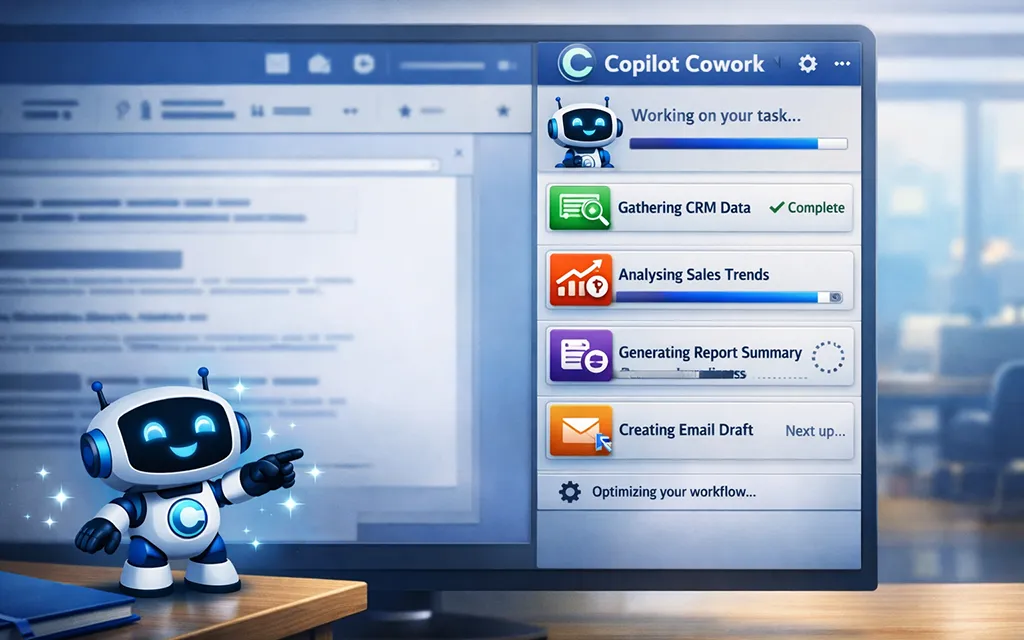
What makes this pattern effective is that the middle task adapts to the operation. The linkedin skill swaps “Draft the post” for “Rewrite profile section” when the user asks for a profile update, or “Analyze recent posts and content mix” when the user asks what to post next. The outer tasks - gathering context and running quality checks - stay the same regardless of the operation.
My corporate-brand-guidelines skill takes progress tracking further with four stages that map to the brand application workflow: confirming context, applying brand pillars, running the compliance check, and reporting what was applied. My corporate-poc-guidelines skill follows a similar pattern: gathering scoping inputs, researching customer engagement history, drafting the document, and running quality checks.
The rule I follow: create tasks for multi-step workflows where the user benefits from seeing progress. Skip task creation for trivial single-step requests - if the answer fits in one response, tasks add overhead without adding clarity.
Scripts and assets
The Agent Skills specification also defines two additional optional directories: scripts/ for executable code the agent can run as part of a workflow, and assets/ for static resources like templates, diagrams, and data files.
Scripts are particularly interesting for skills that involve code generation, validation, or deployment - they let the skill bundle the actual code to execute, not just instructions about what to do. Assets serve as raw building blocks the agent can use during a task, such as document templates or lookup tables.
I have not used either in my own skills yet - my skills are primarily writing and communication focused, so the instruction and reference file model covers my needs. But for teams building skills around technical workflows, these are powerful additions that instruction files simply cannot offer. The full specification for both is documented at agentskills.io .
Comparing instructions and skills
The two formats serve the same goal - teaching an AI how to work - but differ in structure, scope, and activation. Here is a side-by-side comparison:
| Aspect | Instruction files | Agent Skills |
|---|---|---|
| Activation | Glob pattern (applyTo: "**/*.md") | Task-based, matched by description |
| Scope | Workspace-specific | Portable across tools and agents |
| Loading | Always loaded when pattern matches | Progressive: metadata first, then instructions, then references |
| Structure | Flat Markdown, self-contained | Modular: SKILL.md + references/ + scripts |
| Boundaries | Implicit (file pattern defines scope) | Explicit (“when to use” and “when not to use”) |
| Coordination | Not defined | Explicit inter-skill coordination rules |
| Context cost | All content loaded upfront | Only relevant content loaded on demand |
| Standard | Visual Studio Code-specific | Open standard (agentskills.io) |
Neither format is better in absolute terms. Instruction files are simpler and work well for project-specific coding conventions. Skills are more powerful when you need modular, reusable capabilities that work across contexts.
How I built my skills - the journey
The path from instruction files to a working set of Cowork skills was not a single translation exercise. It was iterative, and Cowork itself played a central role in the process.
Starting from scratch with writing-style
I started with the most foundational skill: writing-style. Rather than manually converting my existing instruction files, I asked GitHub Copilot in Visual Studio Code to create a first draft of the skill based on my writing conventions. The result was a SKILL.md file with the basic structure - frontmatter, purpose, and operations - plus a few rules pulled from my existing instructions.
That first draft was rough. The structure was there, but the depth was not. The rules were too generic, the boundaries were vague, and the Quick Start examples were missing. But it was a starting point - and more importantly, it was in the right format.
The real discovery came when I asked Cowork itself to review the draft. I added the newly created writing-style skill and asked Cowork to review it - what was missing, what was too vague, and what needed restructuring. Cowork identified gaps I had not noticed, suggested specific rules to add, and flagged sections where the instructions were too generic to guide an agent reliably. That single review cycle turned a rough draft into something genuinely useful. Having a first draft was valuable. Having Cowork critique it was what made it work.
Letting Cowork refactor my instructions
The next step was where things got interesting. I took my existing GitHub Copilot instruction files - one at a time - and shared them with Cowork. The approach was simple: I would paste the content of an instruction file, explain that these were conventions I had collected and refined for my Visual Studio Code project, and ask Cowork to help me refactor those learnings into a proper Cowork skill. The results were consistently good - Cowork understood the intent behind each rule and translated it into the skill dialect with the right structure, boundaries, and coordination notes.
The key was how you prompt. Framing the request as “here are my learnings, help me turn them into a skill” gave Cowork enough context to produce a well-structured draft on the first pass. Each instruction file became a conversation, and each conversation produced a skill that captured the same knowledge in a format Cowork could act on. This review-and-refine loop turned my existing instruction files into a complete skill library with terminology rules, bullet punctuation conventions, heading structure guidelines, customer-facing rules, and quality checks.
Expanding to more skills
With writing-style as the foundation, I started building skills for the tasks I do on a daily basis. The linkedin skill came next. I translated my LinkedIn instruction file into a skill with post templates, profile guidance, and content strategy. Then sessionize for session abstracts and CFP preparation. Then corporate-poc-guidelines for structured Proof of Concept documents.
Each new skill followed the same pattern:
- Start with a first draft - either generated by GitHub Copilot or written manually based on the existing instruction file
- Ask Cowork to use the skill on a real task and observe where it fell short
- Ask Cowork to review the original instruction file and suggest improvements to the skill
- Refine the skill based on real-world usage and Cowork’s feedback
- Split supporting detail into reference files to keep the core
SKILL.mdlean
The more skills I added, the more important the coordination layer became. Each new skill needed to declare how it related to writing-style - what it inherited and what it overrode or deferred. This inter-skill coordination was something my instruction files never needed because they all loaded at once and the AI had to figure out the priority on its own.
The compounding effect
What surprised me was the compounding effect. Each skill I built made the next one easier. The patterns became familiar - the frontmatter structure, the “When NOT to use” section, the Quick Start examples, the reference file splits. But more than that, Cowork itself became a better collaborator as the skill library grew. With writing-style in place, every other skill automatically inherited the right terminology, tone, and formatting conventions. The skills were not just individual tools - they were a system.
Using Cowork to create and manage skills
One thing I want to emphasize: you do not need to write skill files by hand. Cowork has a built-in skill for creating and managing skills. You can tell Cowork what you want a skill to do in natural language, and it drafts the SKILL.md file, saves it to your Microsoft OneDrive, and the skill is live in the next conversation.
I used this approach extensively after the initial writing-style skill was in place. Instead of opening a text editor and writing YAML frontmatter from scratch, I would tell Cowork: “Create a skill that handles LinkedIn posts using my writing conventions.” Cowork would generate a first draft with the right structure - frontmatter, purpose, boundaries, operations - and save it directly. From there, I could ask Cowork to refine the skill: “Add a Quick Start section with three example prompts” or “Add a quality check that verifies hashtag count.” Each refinement was a conversation, not a manual edit.
This is where Cowork’s built-in skill management capabilities come in. Cowork can list your personal skills, show the contents of a specific skill, validate a skill against the expected structure, and audit your skill library for overlaps or gaps. When I asked “Show my personal skills,” Cowork listed every skill I had created with a short description of when each one triggers. When I asked “Review my linkedin skill for consistency with writing-style,” it identified three rules that conflicted and suggested specific fixes.
The most effective workflow I found was iterative: use a skill on a real task, notice where the output falls short, and then ask Cowork to update the skill based on what you observed. This loop - use, observe, refine - is faster and more grounded than trying to anticipate every edge case upfront.
Tip
When Cowork creates or updates a skill file, ask it to save the file to the output folder in the side panel rather than relying on it to write directly to your Microsoft OneDrive. In my experience, the automatic save to Microsoft OneDrive does not always happen reliably. Downloading the file from the output folder and placing it in the correct/Documents/Cowork/Skills/ subfolder manually has become my standard practice - it is more dependable and gives you a chance to review the file before it goes live.If you prefer to evaluate skill files without leaving Visual Studio Code, the Chat Customizations Evaluations extension from Microsoft is worth a look. It provides LLM-powered semantic analysis of .prompt.md, .agent.md, SKILL.md, and .instructions.md files directly in the editor - evaluating structure, descriptions, and quality against best practices. It is a great learning partner alongside Cowork’s own review capabilities, especially when building your first skills and learning what makes a skill file effective.
What I learned along the way
Building skills was not a copy-paste exercise. A few lessons stood out from the journey:
Descriptions are routing, not documentation
The biggest mistake I made early on was writing descriptions the way I wrote instruction file summaries - brief, human-readable overviews. That approach failed because Cowork never loaded the skill. The fix was to write descriptions as routing rules: list specific phrases users might type, explicitly exclude adjacent concerns, and name the skills that handle those concerns instead. A vague description like “helps with LinkedIn” does not give the agent enough signal to make the right call.
Boundaries matter more than rules
In instruction files, I focused on what the AI should do. In skills, I found that defining what the AI should not do was equally important. Every skill has a “When NOT to use” section that explicitly redirects to other skills. Without these boundaries, the agent might load a skill for a task it was never designed to handle - or worse, load multiple overlapping skills and produce conflicting output.
Coordination is a first-class concern
When I had separate instruction files for writing style and LinkedIn, there was no mechanism to define how they interacted. In the skill format, my linkedin skill explicitly states that it layers on top of writing-style - drawing terminology and grammar rules from one skill while applying platform-specific formatting from another. It even defines which skill wins when the two appear to conflict: writing-style for voice and grammar, linkedin for structure and platform behavior.
Quick Start examples accelerate learning
Adding concrete input-output examples to the Quick Start section made a noticeable difference in how well the agent followed the skill’s intent. Instead of relying solely on rules, the examples show the agent what good looks like. This pattern - showing rather than telling - proved more effective than adding more rules.
Progressive loading changes how you organize knowledge
The 5,000-token constraint on SKILL.md files forced a structural decision I would never have made with instruction files: what does the agent need immediately versus what can wait? My original linkedin.instructions.md was a single file with everything. The skill version splits that into a lean core with four reference files loaded on demand. The result is a more focused agent that does not waste context on profile guidance when all you asked for was a post.
Skills change how you learn
An unexpected side effect of building skills is that it changed how I absorb new knowledge. I recently attended a corporate training session on boosting LinkedIn visibility. In the past, I would have listened, taken a few notes, and moved on. This time, the first thing I did afterward was request the meeting transcript and ask Cowork to review the learnings against my linkedin skill - specifically to identify whether anything from the training should be added or updated.
That shift is subtle but significant. Knowing that every useful insight has a place to land - a skill that will apply it automatically from that point forward - made me listen differently. I found myself more attentive during the session, actively filtering for the kind of knowledge that would make my skill better. Training is no longer something I sit through and hope to remember. It is a pipeline: listen, identify the gold, feed it into the skill, and let it compound from there.
Why I keep my skills private
A question I get asked when talking about this topic: will you share your skill files?
The short answer is no - not the raw files. And I think that is the right approach for most people.
Custom skills are often deeply personal. My writing-style skill does not just contain grammar rules. It encodes how I think about communication, what I prioritize in customer interactions, and what I have learned about effective writing over years of work. My linkedin skill captures my content strategy, my voice, and my understanding of what works for my specific audience. My sessionize skill reflects my speaking philosophy and the feedback patterns I have internalized from dozens of CFP cycles. These are not generic templates - they are distilled professional judgment.
The value of building your skill files comes from the process of creating them
Sharing the raw files would strip them of context. A rule that makes perfect sense inside my skill system - where writing-style provides the foundation and every other skill inherits from it - might be confusing or counterproductive in someone else’s setup. Worse, copying someone else’s skills wholesale means the agent sounds like them, not like you. That defeats the entire purpose.
What I do share freely are the principles, the patterns, and the structural decisions that make skills effective. The frontmatter structure. The “When NOT to use” section. The Quick Start examples. The reference file split. The progress tracking pattern. The coordination layer between skills. These are the building blocks anyone can use to create skills that reflect their own expertise and voice.
Tip
Treat your skill files like your personal notebook - built for you, refined by you, valuable because of your experience. Share the architecture, share the lessons, but build the content yourself. That is where the real value lives.There is one area where I would love to see this change: Organizational skills. Imagine an organization publishing a brand guidelines skill - complete with approved colors, typography, tone of voice, and accessibility requirements - that every employee’s Cowork instance inherits automatically. Or a writing-style skill that enforces consistent terminology, tone, and formatting conventions across all customer-facing communications. Today, each user maintains their own skill library in their personal Microsoft OneDrive. There is no built-in mechanism to share skills across a team. I expect this will change as the platform matures - and when it does, the distinction between personal skills (your voice, your preferences) and organizational skills (shared standards, compliance rules) will become an important design decision.
Considerations and trade-offs
A few things to be aware of when working with Copilot Cowork skills:
- Skills are an open standard, but implementations vary. The Agent Skills specification is maintained at agentskills.io and supported by multiple AI tools. However, each tool may interpret or extend the specification differently. The
cowork:metadata section in the frontmatter, for example, is specific to Copilot Cowork and is not part of the base specification. - Skill descriptions need ongoing refinement. Because descriptions drive routing, a poorly written description means the agent either never loads the skill or loads it for the wrong task. I found myself iterating on descriptions more than on the actual instructions.
- Not everything should be a skill. Simple coding conventions and project-specific rules are still better served by instruction files. Skills are worth the investment when the knowledge is reusable, task-specific, and benefits from progressive loading.
- Organizational sharing is not yet supported. As discussed above, there is no mechanism for distributing skills across an organization. Each user builds and maintains their own library. This is a gap that I expect Microsoft to address as the platform matures - but for now, skill knowledge stays siloed in individual Microsoft OneDrive accounts.
- Skills need regular review. A skill written six months ago may reflect outdated platform behavior, stale branding guidelines, or a writing style you have since moved past. Review your skills periodically - especially those tied to external platforms like LinkedIn where algorithms and best practices evolve - and update them to match your current voice and direction.
For general Cowork considerations - including Frontier program requirements, the personal skill library model, and the fact that custom skills are not validated by Microsoft - see the Considerations section in the previous post.
Tip
If you already have a library of GitHub Copilot instruction files, start by identifying which ones are task-specific and which are always-on conventions. Task-specific instructions are strong candidates for skills. Always-on conventions are better left as instruction files.Final thoughts
Looking back, the most valuable part of this journey was not the skills I built - it was the two-way relationship that emerged. Cowork changed the way I work - progressive loading taught me to separate what an agent needs immediately from what it needs eventually, and task-based activation replaced the habit of scoping knowledge by file type. At the same time, skills changed how Cowork behaves - without them, it is capable but generic. With them, it writes in my voice, follows my terminology rules, and knows when to defer to another skill instead of guessing.
That said, skills do not eliminate the work. Every draft still requires review, refinement, and judgment. What skills do is raise the starting point - they help the agent use your voice instead of a generic one and remind it what you have decided matters.
The real value is not that skills produce finished output - it is that skills produce output worth finishing.
My GitHub Copilot instruction files still live in my repositories and govern how GitHub Copilot behaves in Visual Studio Code. Copilot Cowork skills serve a different context - Microsoft 365, where the tasks are emails, documents, and stakeholder communications. The two systems run side by side, each solving different problems with the same underlying knowledge. Maintaining both is a two-track effort, but the two contexts naturally filter what belongs where - a formatting rule for blog post drafts is irrelevant to Cowork, and an algorithm-aware hashtag strategy has no place in an instruction file that governs Markdown formatting.
If you have been investing in GitHub Copilot instruction files, that investment is not stranded. It is the raw material for something more powerful. The knowledge is yours - the format is just how you package it.
Happy exploring!
–Jesper
Header image attribution: Image created with help from Microsoft Copilot