
What if the skills you built are not as good as you think they are?
I built four custom skills in Microsoft Copilot Cowork before it occurred to me to ask whether any of them were actually good. They worked, mostly, so I assumed they were fine. Then I asked Cowork to score them, and the numbers told a more honest story than my own reading ever could. In my Exploring Microsoft Copilot Cowork skills post, I covered how to build skills - the format, the structure, the journey from GitHub Copilot instruction files to portable Agent Skills. This post picks up where that one left off. You have created your skills. Now what?
The answer, it turns out, is not “move on.” It is “measure, optimize, and maintain.” Cowork has a built-in skill management capability that goes far beyond creating and listing skills. It can score them against a quality rubric and optimize them with a gated improvement process. It can scan for conflicts across your entire library and validate their structure. The part that surprised me was how much room for improvement existed in skills I thought were already solid.
Custom skills, and why you cannot judge them by reading
A custom skill in Cowork is a small instruction file that teaches the assistant how to handle one kind of request - drafting a LinkedIn post, enforcing brand guidelines, writing a session abstract. You describe when the skill should trigger, what it should do, and where it should stay out of the way. The Exploring Microsoft Copilot Cowork skills post covers the anatomy and structure in detail.
The catch is that a skill can read beautifully and still behave badly. A description that feels clear to the author may not contain the phrases a user would actually type. A skill with no guardrails looks fine on a calm day and falls apart the moment a detail is missing. Reading your own skill is like proofreading your own writing - you see what you meant, not what is on the page. That is the gap that scoring closes.
Image viewer

Scoring: four dimensions and a publish bar
When you ask Cowork to list and score your skills, it grades each one from 0 to 100 across four dimensions:
- Trigger clarity - does the skill activate at the right moment, for the phrases people really use?
- Instruction specificity - does it know exactly what to do, with named steps and an output format?
- Scope boundaries - does it stay in its lane instead of taking work that belongs to another skill?
- Robustness - does it handle surprises, missing input, and risky actions safely?
There is also a Minimum Value Bar - a publish threshold a skill has to clear before it is safe to rely on. The bar rises with risk. A skill that only summarizes text is held to a lower floor than one that can send an email or post a message on your behalf.
The four dimensions give you a structured way to understand where a skill is strong and where it falls short. A high overall score with a weak dimension is more useful than a single number - it tells you exactly where to focus your effort.
The prompt that kicked off the entire process was straightforward:
Please list and score my custom skillsPrompt: Requesting a full skill audit
That single sentence triggered a full audit - Cowork scored every skill in my personal library, ranked them, and identified the weakest dimension for each.
What my scores revealed
My four skills came back between 87 and 97. All “Excellent” on paper. However, the dimension breakdown was the useful part, because nearly every skill lost its points in the same column.
| Skill | What it does | Score | Weakest dimension |
|---|---|---|---|
| writing-style | Writing conventions for emails, summaries, drafts | 97 | Instruction specificity (22/25) |
| brand-guidelines | Brand rules for documents | 91 | Robustness (21/25) |
| LinkedIn posts and profile optimization | 88 | Robustness (18/25) | |
| sessionize | Session abstracts, CFP, speaker profile | 87 | Robustness (14/25) |
The pattern was clear. Three out of four skills had robustness as the weakest dimension. The sessionize skill scored 14 out of 25 on robustness alone - the lowest dimension score across my entire library. Only the writing-style skill broke the pattern, with instruction specificity as its weakest column instead.
Robustness: my blind spot
Robustness, it turns out, is mostly about what you wrote for the bad day rather than the good one. Three things move the score:
- Guardrails - explicit rules like “never fabricate a metric” or “change the style, not the message”
- Failure handling - a plan for when the topic, the link, or the audience is missing, instead of guessing
- A review gate - a clear “show this for review before it is sent or published” step
None of my skills were missing the idea. They were missing the words. My sessionize skill had a solid guardrails section, yet it never said what to do when the event theme was unknown. It never stated a review-before-submit step. The instructions were clear about the happy path and silent about everything else.
This is the gap that scoring makes visible. Without a structured assessment, I would have kept reading my skills and thinking they were fine - because the happy path was well documented. The score forced me to look at the edges.
Optimization: the gated improvement loop
Scoring tells you where a skill is weak. Optimization is how you fix it. Cowork’s optimization process follows a gated improvement model - it proposes targeted edits, re-scores after every change, and keeps the edit only if the score strictly improves. An “improvement” that makes the skill worse gets reverted automatically.
That one rule removed the fear of tinkering, because the downside is capped at zero.
Starting the optimization was just as simple as scoring:
Please review and optimize my sessionize skillPrompt: Starting a gated optimization
Cowork read the full skill, identified the specific robustness gaps, proposed targeted edits, and re-scored after each change. I started with my sessionize skill - the lowest scorer at 87 with a robustness dimension of 14 out of 25. The optimization added three things:
- A “Handling missing or ambiguous input” section - what to do when the topic, event, audience, level, or word limit is missing
- A strengthened review gate - always show the full draft for review before the user submits to a CFP or updates Sessionize
- Two new guardrails - always confirm the event theme and audience before reusing a prior abstract, and never pad to hit a word count
The result: 87 went to 98. Robustness went from 14 out of 25 to a full 25 out of 25. The gate passed, so the edits stayed. The entire process took minutes, not hours. The same pattern applied to my linkedin skill - same weak dimension, same type of fixes, same jump in score.
Image viewer
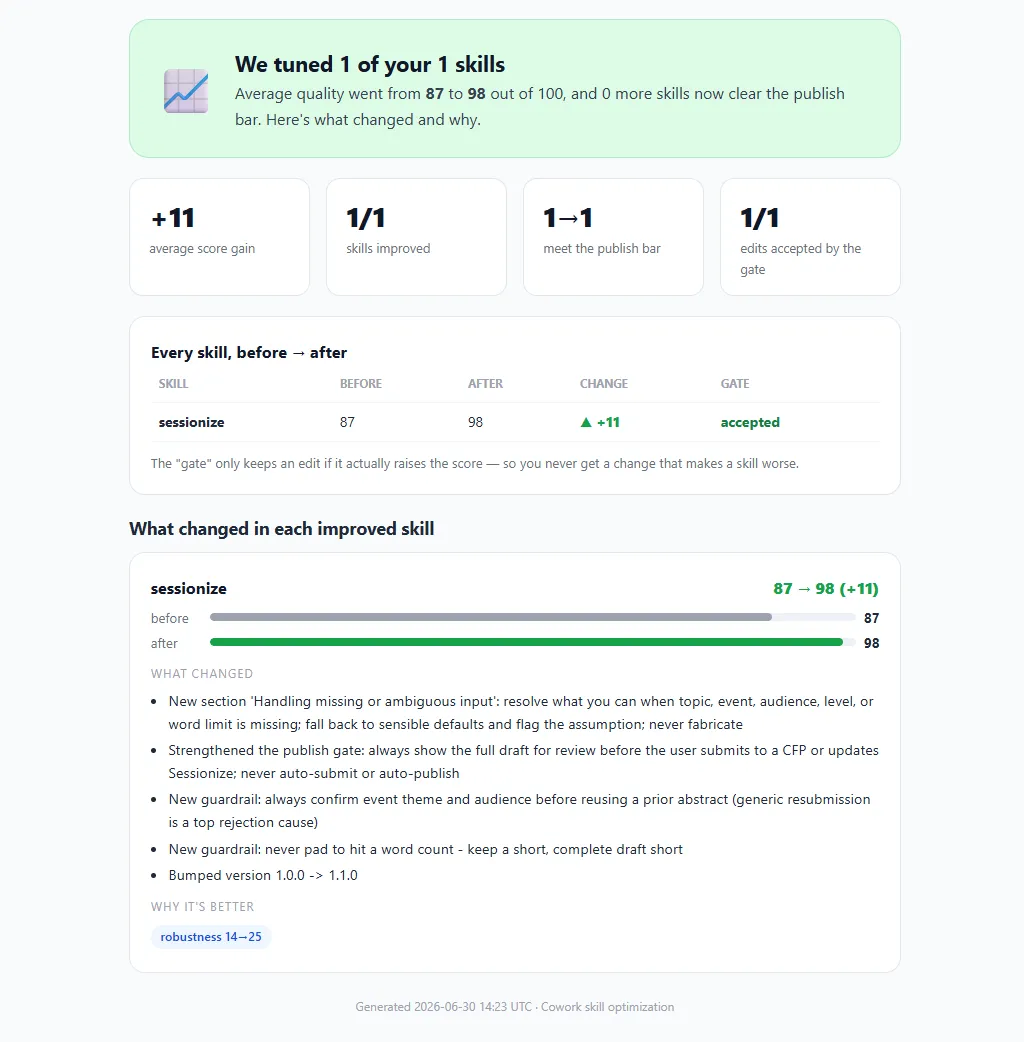
After each optimization, Cowork generates a detailed report showing what changed, the before-and-after scores per dimension, and whether the gate passed. This report becomes a useful reference when applying the same patterns to other skills.
Tip
Start optimization with your lowest-scoring skill. The same robustness gaps tend to repeat across your entire library, so fixing the first one teaches you the pattern. Every skill after that is faster.The conflict scan: real collisions versus keyword noise
Scoring tells you whether one skill is good in isolation. It says nothing about whether two skills fight over the same request. That is what the conflict scan answers.
When you have a family of related skills - in my case a cluster of writing skills that share a house style - they can start reaching for the same triggers. The scan itself is another one-line prompt:
Run a conflict scan across all my skillsPrompt: Running a conflict scan across all skills
The conflict scan checks every pair, compares each skill against the built-in ones, and marks each overlap as HIGH, MEDIUM, or RESOLVED.
Here is the distinction that made the report useful. There is a difference between two skills sharing a trigger phrase and two skills sharing a keyword. Sharing “write a LinkedIn post” is a real collision - two skills competing for the same request. Sharing the word “create” is not. My scan flagged six pairs, which looked alarming until I saw that not one of them shared an actual trigger phrase. The flags were generic vocabulary - “create,” “tone,” “documents” - that any set of writing skills will have in common.
But the scan did surface one genuine ambiguity. My linkedin skill and my sessionize skill both answered “rewrite my …,” and neither named the other. The fix was one line in each: “Do NOT use for X - use Y instead.” That kind of explicit handoff, called a delegation, is what flips a conflict from open to resolved. One sentence per skill, and the pair that mattered came back clean.
Here is a simplified view of what the scan returned:
| Skill A | Skill B | Overlap type | Severity | Status |
|---|---|---|---|---|
| writing-style | Shared keyword: “tone” | MEDIUM | Resolved (explicit inheritance) | |
| writing-style | sessionize | Shared keyword: “create” | MEDIUM | Resolved (explicit inheritance) |
| writing-style | brand-guidelines | Shared keyword: “documents” | MEDIUM | Resolved (explicit inheritance) |
| brand-guidelines | Shared keyword: “create” | MEDIUM | Resolved (no trigger overlap) | |
| sessionize | Shared trigger: “rewrite my…” | HIGH | Resolved (delegation added) | |
| brand-guidelines | sessionize | Shared keyword: “tone” | MEDIUM | Resolved (no trigger overlap) |
Most pairs flagged shared vocabulary that any set of writing skills will have in common. The only HIGH-severity pair - linkedin and sessionize competing for “rewrite my…” - required an explicit delegation to resolve.
Note
Run a conflict scan once you have more than two or three related skills. Trigger collisions are invisible until you look for them, and they tend to appear between skills that feel obviously distinct to you but share enough vocabulary to confuse an agent.The full skill management toolkit
Scoring, optimization, and the conflict scan are the three capabilities I used most. But Cowork’s skill management covers the full lifecycle - from creation to deletion. Discovering the full menu was itself a one-line prompt:
What options does the Skill management skill offer?Prompt: Exploring available skill management operations
Cowork responded with the complete list of operations grouped by purpose - authoring, quality and safety, multi-skill coordination, and housekeeping:
| Operation | What it does |
|---|---|
| Create | Generates a new skill from your intent, auto-scores it, and steers you into improvement |
| Optimize | Proposes targeted edits, keeps each one only if the score strictly improves |
| List / view | Lists every skill with its score, or shows one skill’s full content and assets |
| Score / audit | Grades a skill across the four dimensions with the publish gate |
| Validate | Structural checks (name, frontmatter, size, count) plus asset checks |
| Security scan | Scans bundled code and prose for injection, exfiltration, or credential risks |
| Behavioral test | Runs the skill against should-trigger and should-not-trigger prompts and judges the output |
| Conflict scan | Detects triggering conflicts across skills and against built-ins |
| Delete | Removes a skill behind a confirmation gate |
| Personal instructions | Views and edits your personal copilot-instructions.md |
A useful detail underneath all of this: evaluation is scaled to reach and risk. A polished personal skill gets a light structural-and-score pass. A skill that ships widely or takes risky actions earns the full battery - behavioral tests, a trust-and-safety gate, and human review.
The behavioral test is worth highlighting. Scoring evaluates the skill’s text. A behavioral test evaluates what the skill actually does - it runs the skill against prompts that should trigger it and prompts that should not, then judges whether the output and actions match expectations. This is the check to run when a skill looks good on paper but behaves unpredictably in practice.
The security scan is the check to run before trusting a skill you did not write yourself. It scans bundled code and prose for prompt injection, data exfiltration patterns, and credential handling risks. If you ever adopt a skill from a colleague or a community source, run this before adding it to your library.
Practical habits for skill maintenance
Scoring, optimizing, and scanning are reactive - they fix what already exists. But the patterns that kept showing up in my scores pointed to habits I could have built in from the start. Most of the robustness gaps, the trigger mismatches, and the missing delegations were not mistakes I made once. They were mistakes I made consistently because I had no process beyond “write the skill and move on.”
If you are writing and maintaining custom skills, a few habits would have saved me the cleanup I went through:
- Write trigger phrases the way a user would actually ask, not the way you think about the feature
- Add a “Do NOT use for X - use Y instead” line to every skill that lives near another one
- Write the guardrails first - what never to do, what to confirm, and what to do when input is missing
- Keep each skill in a single lane, and let it hand off everything else
- Re-score after every change, and keep only the edits that move the number up
- Review your skill library periodically - a skill written three months ago may reflect outdated platform behavior or a voice you have since moved past
None of these are difficult on their own. The hard part is doing them before you have a score telling you what you missed. I could have avoided most of my robustness gaps by spending five minutes on guardrails and failure handling at creation time - instead of discovering the gaps weeks later through a scoring pass. The habits are simple. Building them into your process before the tool asks you to is the shift that matters.
Tip
If you want to explore how Cowork handles skill management behind the scenes, ask it to list its built-in skills and look for the management skill that powers scoring, optimization, and conflict scanning. You can also ask Cowork to save the skill definition to your output folder for offline review - useful if you want to study the rubric, the optimization gates, or the conflict detection logic at your own pace.
Please list the built-in skills and save the skill management skill to the output folderPrompt: Exporting the management skill for offline review
The file is named skill-skills.md and contains the full instruction set for scoring, optimization, and conflict scanning. It is a useful reference if you want to understand the logic behind the scoring rubric or the optimization gates.
Final thoughts
I want to be careful not to oversell a score. A 98 does not make a skill correct. A flagged conflict is not always a real problem - half of mine were noise. The value was never the number itself. It was that scoring and the conflict scan made the invisible visible, so I could spend ten minutes fixing the thing that actually mattered instead of guessing at it.
That is the shift worth keeping. I write skills differently now - guardrails first, one lane each, triggers in the user’s own words - not because a tool told me to, but because seeing the quality measured made the habits obvious. The process of scoring, optimizing, and scanning changed how I think about building skills in the first place.
The number is a guide, not a grade. Its value is in making the invisible visible.
If you have been building skills and assuming they are done, ask Cowork to score them. The results might surprise you the same way they surprised me.
Happy exploring!
–Jesper
Header image attribution: Image created with help from Microsoft Copilot