
Should you apply the Microsoft Intune security baselines because Microsoft has already decided which settings are secure?
I do not think the Microsoft Intune security baselines are bad. They contain valuable recommendations and can help you understand how Microsoft approaches a secure configuration. However, I do not fancy using them as the foundation of my device configuration strategy.
A friend of mine says, “They are great if you do not know what you are doing.” I see it differently. If you do not know what you are doing, you should not apply a large collection of security settings that you cannot explain. A baseline does not remove the need to understand each setting. It makes that understanding even more important.
I have seen the consequences more than once. Colleagues and peers reach out after applying the full security baseline to their environment, only to find that nothing works as expected. The device ends up with multiple conflicting policies, applications fail, and the team cannot determine which setting caused the problem. To make matters worse, some settings are tattooed to the device. Once applied, they persist even after the policy is removed. Reverting them requires a new policy that explicitly sets the opposite value - a task that can involve significant effort when dozens of settings need to be unwound.
The five thoughts
Based on my experience with device management, I prefer to build and maintain my own complete set of policies. I do not build them from experience alone. I use several recognized security baselines and frameworks as inspiration, then add what I have learned from real environments: what works, what does not, and what creates more friction than value. I want to know why every setting exists, what it does to the user, and how it fits into the wider platform. These observations come from years of building, reviewing, and inheriting device configurations across different organizations. Each one represents a limitation I have encountered when relying on the built-in baselines as a foundation rather than a reference.
1. A baseline is a recommendation, not your strategy
The Microsoft Intune security baselines are groups of recommended settings for Microsoft products. Microsoft brings the settings together in templates so administrators can deploy a known security posture without configuring every item from an empty policy.
That has value. The settings are based on guidance from Microsoft security teams, product groups, and lessons learned from real threats. A baseline can reveal controls you have missed. It can also give a new environment a better starting point than an unconfigured device.
But a starting point is not a strategy.
Your organization has its own users, applications, risks, support model, and legal requirements. A setting that makes sense for a tightly controlled administrative workstation might be unnecessary on a device used by a designer or field worker. The same control can reduce risk in one context and stop work in another.
The core misconception is that applying a baseline transfers the responsibility for those decisions to Microsoft. It does not. Your organization still owns the result. When a setting blocks a workflow or causes an application to fail, the user does not call Microsoft. The user calls your service desk.
I want every enforced setting to have a reason that relates to the organization. That reason might be a known threat, a compliance requirement, an operational need, or a deliberate user experience choice. “It was included in the baseline” is useful evidence, but it is not enough on its own.
2. You must understand what you enforce
Security settings often look harmless when read as a list. Their effect only becomes clear when they meet an actual device, application, or user workflow. A single setting can affect authentication, file handling, browser behavior, network access, or software compatibility.
This is why the phrase “great if you do not know what you are doing” makes me uncomfortable. A broad security template is not a substitute for knowledge. If you cannot explain what a setting controls, you cannot judge its risk. You also cannot test it properly or support it when the outcome differs from what you expected.
There is another practical problem. Baselines change. Microsoft releases new baseline versions as products and recommendations evolve. Moving to a new version is not the same as accepting a normal definition update. Settings can be added, removed, or given different defaults. Each change needs review and testing against your environment.
With my own policies, I can make that review explicit. I can compare recommendations, decide which changes belong in my framework, and deploy them in waves. I can document why a setting changed and identify the devices affected by it. That process takes more work, but it also creates knowledge inside the team.
A policy should be explainable before it is assignable. If the team cannot describe its purpose and likely impact, the policy is not ready for production.
3. The built-in baselines do not cover your full environment
The built-in Microsoft Intune security baselines mainly focus on Microsoft products and technologies. That is understandable. Microsoft can provide deep recommendations for Windows, Microsoft Edge, and Microsoft Defender products because it owns those platforms.
However, most organizations do not run a Microsoft-only environment. Google Chrome and Mozilla Firefox may be installed alongside Microsoft Edge. Other applications introduce their own security settings, update behavior, extensions, and privacy choices. Those products still need to be configured and maintained.
In my experience, security companies often propose a strong collection of Windows policies and treat that as the device security configuration. Browser policies are frequently limited or forgotten. Policies for Microsoft 365 Apps receive too little attention as well, even though settings for macros, add-ins, Protected View, and document handling can have a direct effect on both security and daily work.
The same gap appears with other third-party products. Every supported application adds its own settings, update process, and potential attack surface. You should keep the complete application portfolio in mind when building your configuration. A hardened Windows device is not fully managed when the applications used every day are left at their defaults.
Important
Most security baselines focus on security settings rather than the complete product update lifecycle. They rarely define how often a product should check for updates, which release channel to use, or how quickly an update must be installed. Restart deadlines, user notifications, maintenance windows, and rollback plans usually require separate policies.Those choices are still part of the security posture. A well-configured application becomes a risk when it remains outdated. However, forcing updates and restarts without considering active work can cause data loss, interrupted meetings, and frustrated users. A complete policy framework must therefore manage both update speed and restart behavior. It must keep products current without treating the user experience as an afterthought.
The result is two policy models running side by side. Microsoft products are managed through baseline templates. Non-Microsoft products are managed through settings catalogs, imported administrative templates, or scripts. The split makes ownership harder to see and leads to different naming, testing, and documentation practices.
The question is simple: if you already need a process to research, create, test, and maintain policies for products outside the built-in baselines, why use a separate process for the Microsoft settings?
4. Policy ownership needs a deliberate structure
When policies grow organically - a baseline here, a custom profile there, a script for a third-party product - ownership becomes unclear. No single person can describe what the environment enforces or why. Different products follow different naming patterns, different testing cadences, and different documentation habits.
Without a deliberate structure, policies overlap, conflict, or leave gaps that nobody notices until something breaks. Troubleshooting becomes harder because no one can tell whether a setting belongs to a security policy, a user experience choice, or a leftover experiment.
A policy framework solves this by separating policies by purpose. When the intent is visible in the policy name and assignment, anyone on the team can understand what a policy does without opening it. That visibility also makes it easier to identify gaps: if you cannot find a policy for a specific product or area, it probably does not exist yet.
The alternative - applying a baseline and adding custom policies around it - tends to blur the line between what Microsoft decided and what the organization decided. Over time, that ambiguity makes it harder to review, update, or explain the configuration as a whole.
5. Security should not stand alone
Device configuration should never be security only. I would go further: it should not even be security first in every decision. Usability and user productivity should sit a fraction above security.
That statement may sound uncomfortable. Security teams are expected to reduce risk, and a restrictive setting can look like the safest choice. But a device that prevents people from doing their work is not secure in practice. Users will look for another route. They may move data to an unmanaged service, use an unapproved browser, delay updates, or find a way around the control.
Caution
Weak usability can create weak security. Users will find another route when a device prevents them from doing their work.Part of the problem is organizational. In many environments, IT Security defines the rules and the device management team applies them. The device team often has no say in what gets enforced or how it affects the user. Security teams tend to optimize for risk reduction and compliance metrics. Device teams see the support tickets, the workarounds, and the frustrated users.
When the team closest to the device has no voice in the configuration, usability suffers. The device management team should own the policy framework, with input and guidance from IT Security. Both teams share the goal of a secure and productive environment, but they measure success differently. That difference needs to be acknowledged, not ignored.
I use a simple triangle when thinking about device policies:
- Usability - Can people complete their work without unnecessary friction?
- Security - Does the configuration reduce meaningful and relevant risk?
- Manageability - Can IT deploy, monitor, support, and change the configuration?
All three areas matter. Security often receives the most attention because its risks are easier to describe. However, usability and manageability decide whether the controls survive contact with daily work.
Putting usability a fraction above security does not mean accepting avoidable risk. It means starting with the outcome the user needs and designing the safest practical route to that outcome. A secure configuration should support productivity rather than compete with it.
This balance is another reason I build my own policies. A security baseline naturally focuses on security. It cannot know the experience my users need or the operational limits of my support team. My policy framework can include both the hardening settings and the choices that improve the device experience. It lets me evaluate them together instead of treating usability as an exception raised after deployment.
What I do instead
Criticizing baselines is easy. The harder question is what replaces them when you decide to build your own. My answer is a policy framework built on recognized security sources, structured by purpose and product, and maintained as a single set of decisions across both Microsoft Intune and Group Policy.
My policies draw from several credible sources. I compare their recommendations instead of treating any single framework as the answer, then decide what fits the risks, users, and applications in the environment.
- Microsoft Security Compliance Toolkit provides Microsoft’s recommended security baselines in deployable formats. It also includes tools for comparing current policies with later baseline versions.
- Microsoft security baselines guide explains the purpose and design principles behind the Windows security baselines.
- DoD Cyber Exchange Group Policy Objects provides configuration templates that support the Defense Information Systems Agency Security Technical Implementation Guides (DISA STIGs).
- National Cyber Security Centre Device Security Guidance provides practical advice and recommended configurations for deploying and managing common device platforms.
- Australian Signals Directorate publishes cyber security guidance through the Australian Cyber Security Centre, including the Essential Eight mitigation strategies and maturity model.
- CIS Benchmarks provides consensus-based configuration recommendations for operating systems, browsers, cloud services, and many other technologies.
The DoD Cyber Exchange downloads provide more than a written STIG. The packages include ADMX templates, Group Policy backups, reports, WMI filters, and STIG checklists. They show how recommendations translate into deployable configuration. However, DISA warns administrators to test in a representative environment because a generic GPO cannot account for every application or operating system variant.
CIS is an especially valuable documentation resource. After creating a free CIS account, you can download the Benchmark PDF files at no cost. Each recommendation explains what to configure and why it matters. The documents also describe how to assess and apply the setting. That combination of why, what, and how makes them useful even when you do not implement every recommendation.
Several of these frameworks ship Group Policy Objects alongside their documentation. I use the Policy Analyzer tool from the Microsoft Security Compliance Toolkit to compare my own GPOs against the framework GPOs and to compare different versions of the same framework against each other. That comparison reveals which settings changed between releases, which recommendations were added or removed, and where my configuration drifts from the latest guidance.
Image viewer
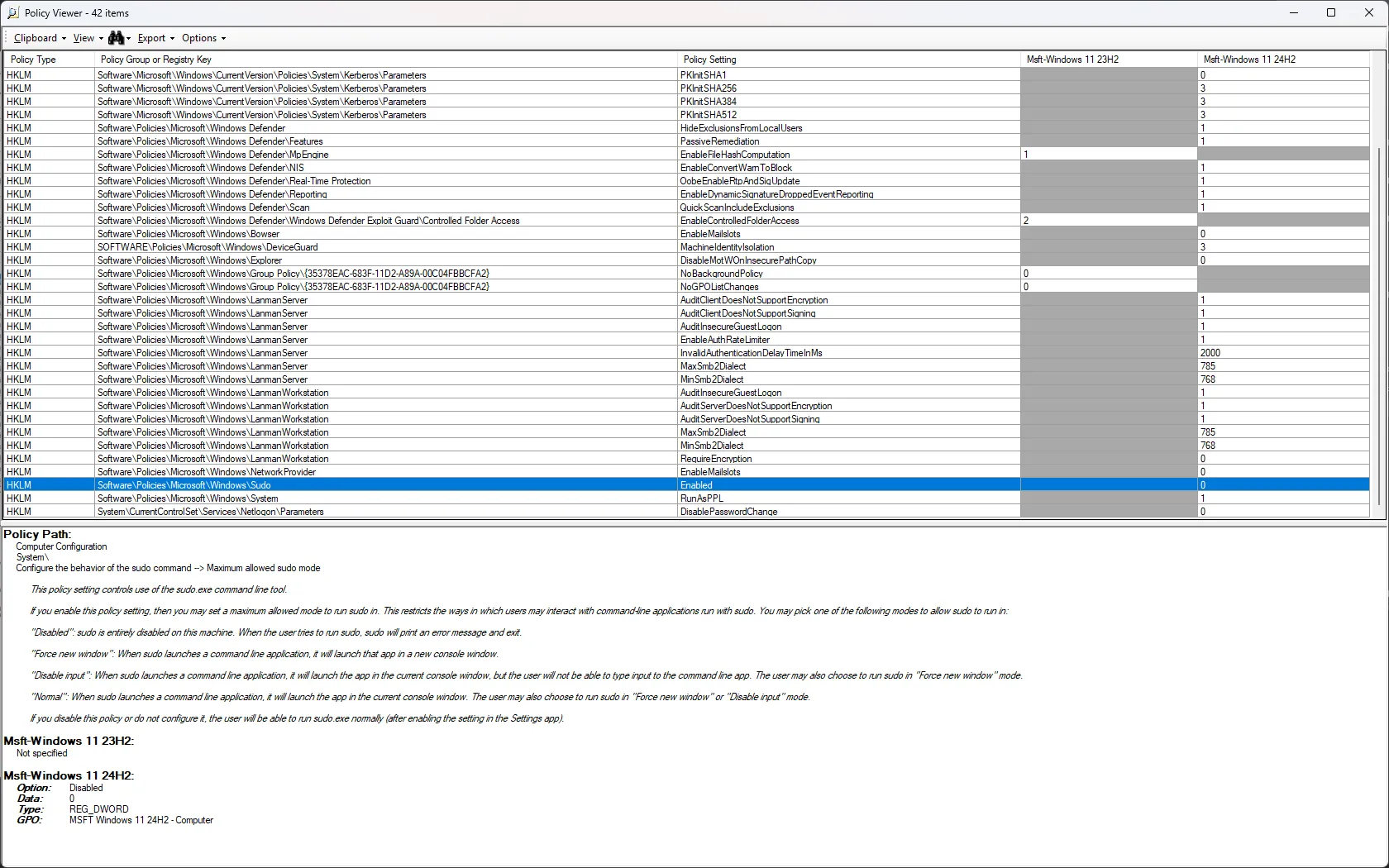
Because Policy Analyzer works with any exported GPO, I can load my complete framework into a single comparison - Microsoft Edge, Microsoft 365 Apps, Google Chrome, Windows, Microsoft OneDrive, and every other product I manage. That means I can compare the entire policy set from one version to another, or from one environment to another, simply by exporting the GPOs into a folder. The comparison covers all settings, not only the security-related ones. When a new framework version appears or a colleague asks me to review their environment, I export and compare in minutes.
Image viewer
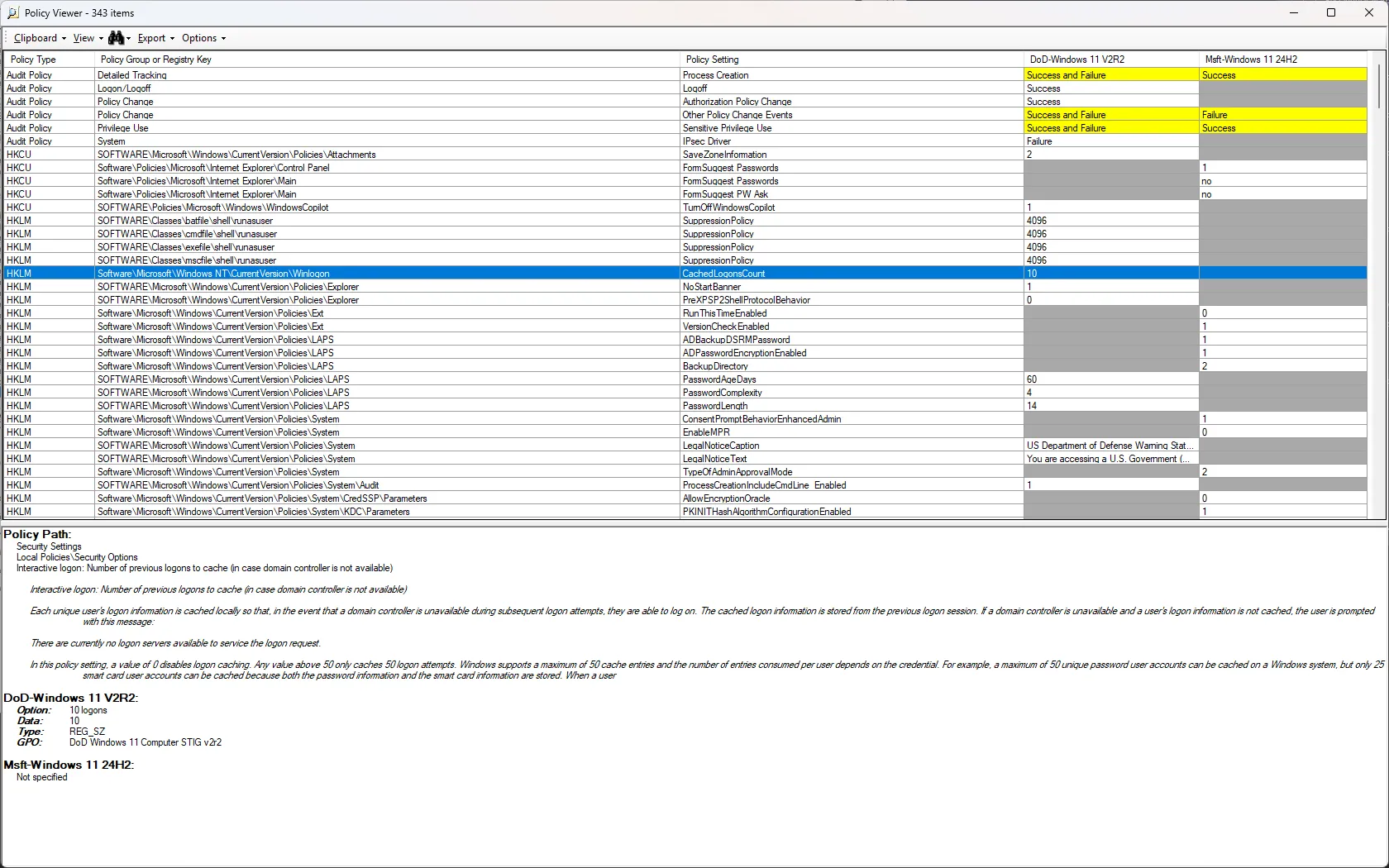
This workflow is harder to replicate with Microsoft Intune policies. There is no equivalent tool that lets you load two sets of exported policy JSON files and compare them side by side the way Policy Analyzer handles GPOs. I still maintain GPO-based reference copies for this reason. When a framework releases a new version, I compare it in Policy Analyzer first, then carry the relevant changes into my Microsoft Intune policies. It adds a step, but it gives me a clear view of what changed before I touch production.
A baseline is a recommendation, not your strategy.
Microsoft makes a strong case for sticking with well-known and proven solutions . I agree with that principle. Building my own policies does not mean inventing unique security settings. It means starting with proven recommendations, understanding their purpose, and turning them into policies that fit the environment. The policy objects are mine. The security knowledge behind them comes from sources that have already been tested by many others. But the experience of implementing them - learning where settings conflict, where they break applications, and where they create friction that no framework warned about - is equally valuable. That knowledge does not come from reading a benchmark. It comes from deploying one and living with the result.
Policy structure
Policy structure is as much about communication as it is about configuration. When every policy has a clear purpose visible in its name, the team can discuss changes without opening each profile first. It also prevents the common problem of a single large policy doing too many things at once, where changing one setting means retesting everything.
My framework separates policies into four types:
- Endpoint security policies protect devices through controls such as Microsoft Defender Antivirus, Microsoft Defender Firewall, and BitLocker
- Configuration settings policies define the device and application experience, including appearance, accessibility, language, performance, and user-facing behavior
- Security settings policies apply selected security recommendations for Windows and applications based on documented risks and requirements
- Update settings policies control how and when products receive updates, including release channels, installation deadlines, restart behavior, and user notifications
Within each type, I split policies further by product. Microsoft Edge gets its own configuration policy, its own security policy, and its own update policy. Microsoft 365 Apps follows the same pattern. Windows itself has dedicated policies for general settings, and I have a dedicated Remote Desktop Protocol configuration and so on. I never mix settings for different products in a single policy, and I never mix configuration, security, and update settings within the same profile. That separation costs more policy objects, but each one has a clear scope.
I also split policies into user settings and computer settings. This aligns my Microsoft Intune policies with my Group Policy Objects, since both are part of the same framework. The split matters because some settings may need to apply on servers, Remote Desktop Session Hosts, or other platforms where only Group Policy is available. Keeping the user and computer scope consistent across both delivery mechanisms makes the framework portable and easier to maintain as a single set of decisions.
Image viewer
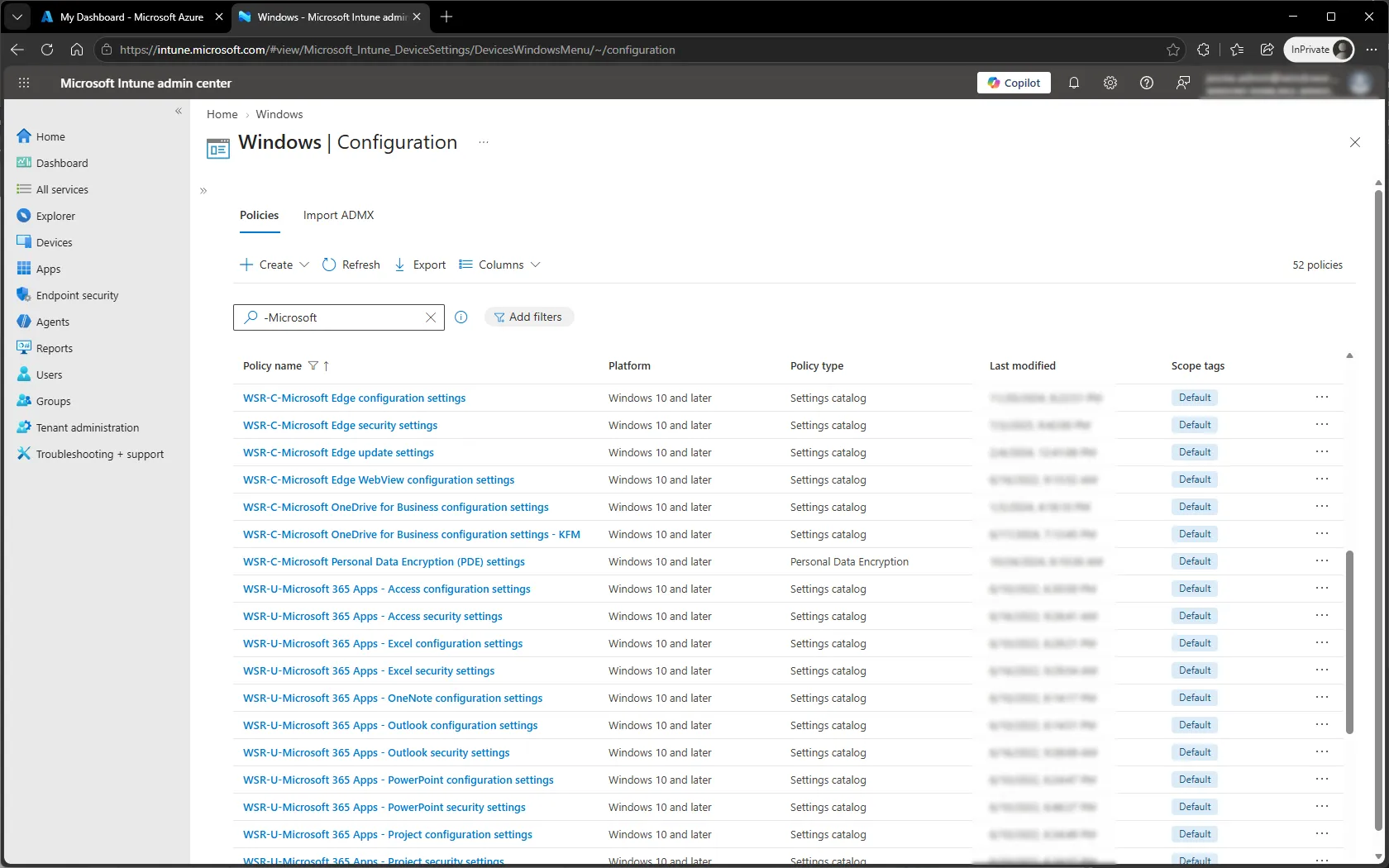
I separate policies by audience. A general policy carries the settings that apply to every device. Department-specific or country-specific requirements - a different start page in Microsoft Edge or Google Chrome, regional language settings, or a tailored feature configuration - go into smaller, narrowly assigned policies. The general policy handles the majority of settings. The narrower policies handle only the differences.
One rule ties this together: no setting appears in more than one policy. If a setting is configured in the general security policy for Microsoft Edge, it does not also appear in a department-specific policy. This eliminates Microsoft Intune policy conflicts by design. When two policies configure the same setting with different values, Microsoft Intune flags the setting as a conflict and does not apply either value. The device is left without the intended configuration, and the administrator must resolve the overlap before the setting takes effect. I apply the same discipline to Group Policy Objects. Configuring the same setting in multiple places with different values is a maintenance problem waiting to surface.
This separation makes troubleshooting easier. If a user reports that an application behaves differently, I can narrow the investigation based on the policy purpose and deployment ring. Smaller and focused policies also support staged rollouts and make rollback decisions more precise.
I configure settings explicitly when I expect a certain outcome. Some administrators question why a default should be enforced when a standard user cannot change it. My answer is consistency. A default can change between product versions. Another policy or application can alter it. If the organization expects a setting to remain in a known state, that state should be managed.
The result is a shared language for discussing policy. It shows what is protected, what is configured for the user, what is required for security, and how products stay current. That visibility is difficult to achieve when the main design decision is simply to apply a baseline and hope for the best.
Final thoughts
Microsoft Intune security baselines are useful. I read them, compare their settings, and use them as a source when reviewing my own framework. What I do not do is mistake a collection of recommendations for a complete device strategy.
I want to be clear: I am not suggesting that administrators should avoid the built-in security baselines. I highly encourage every administrator to study them. They represent solid security thinking and are an excellent starting point for understanding what Microsoft recommends. However, I believe administrators should consider the best way to protect their estate of devices while ensuring usability, productivity, and security work together rather than against each other.
Building your own policies requires time and discipline. You need to research settings, test changes, document decisions, and maintain policies for every supported product. But you need most of that process anyway - non-Microsoft applications will not manage themselves because you applied a Microsoft baseline.
The question is whether you can explain and defend the resulting experience. If you can explain every decision, test its effect, and balance it against the work people need to do, you have a policy framework. If you cannot, you only have a template assigned to a group.
What does your policy framework optimize for when security and usability pull in different directions?
–Jesper
Header image attribution: Image created with help from Microsoft Copilot