




Have you ever wanted to be among the first to experience what’s next for Windows?
The Windows Insider Program is a community of millions of Windows enthusiasts who get to be the first to see what’s next. Windows Insiders run previews of the platform, called Windows Insider Preview Builds, then give feedback and engage directly with Microsoft engineers to help shape the future of Windows.
Joining the Windows Insider Program offers a wealth of benefits, opportunities for learning, and it can be an incredibly rewarding experience. Whether you’re an IT professional wanting to prepare for upcoming changes, a tech enthusiast eager to explore cutting-edge features, or simply someone who loves being part of something bigger, the Windows Insider Program has something for you.
My Insider journey
I still remember the excitement when Microsoft announced the Windows Insider Program on September 30, 2014. The very next day, October 1, 2014, the program officially launched, and I was among those eager early adopters who signed up immediately. Being part of something new, getting a direct line to Microsoft engineers, and helping shape the future of Windows? Count me in!
The phrase “I’m a Windows Insider” quickly became a rallying slogan for early adopters and enthusiasts who wanted to identify themselves as part of the Insider community. It captured the spirit of belonging to something new and exciting.
Image viewer
What started as a program focused on Windows 10 has evolved significantly over the years. Microsoft expanded the Insider Program to include Windows Server in 2017 and Windows 11 in 2021. As of December 2024, the Windows Insider Program has been running for over 10 years, and I’ve been along for the ride since day one.
Looking back at more than a decade of Insider builds, I’ve witnessed countless features evolve from early previews to polished releases, and I’ve seen firsthand how community feedback shapes the Windows we use today.
Over the years, I’ve experienced the thrill of testing cutting-edge features, the occasional frustration of a buggy build (that’s the Insider life!), and the satisfaction of submitting feedback that actually made a difference. Along the way, I was honored to be part of the Windows Insider MVP program, a recognition that has since been retired but represented a special connection between Microsoft and the most engaged members of the Insider community.
Image viewer
.](https://dotjesper.com/2024/5-reasons-you-should-join-the-windows-insider-program/img/image_3163.webp "Windows Insider ten-year anniversary Wallpaper")
I’ve had the pleasure of meeting the Insider group multiple times, joining the Insider team’s chat, and attending Microsoft Ignite and other events where the Insider community comes together. These experiences have reinforced what makes the program special: it’s not just about the software, it’s about the people. The connections I’ve made with fellow Insiders and Microsoft engineers have been invaluable, both professionally and personally.
Throughout my Insider journey, I’ve been actively reporting issues and sharing ideas through the Feedback Hub. There’s something deeply satisfying about seeing a bug you reported get fixed or a feature you suggested make its way into a future build. It’s a reminder that your voice truly matters in shaping Windows.
It’s been a journey of continuous learning and discovery, and I wouldn’t trade it for anything.
1. Get early access to the latest features
One of the most exciting benefits of joining the Windows Insider Program is getting your hands on new features before anyone else. As an Insider, you’ll be among the first to preview new Windows features, updates, and improvements, sometimes months before they reach the general public.
Being an Insider means you’re not just watching the future unfold, you’re actively participating in it.
For IT professionals, this early access is invaluable. You can test upcoming features in your environment, identify potential compatibility issues, and prepare your organization for smooth transitions when updates roll out to the general public.
2. Your feedback shapes the future of Windows
The Windows Insider Program isn’t a one-way street. Microsoft genuinely listens to Insider feedback, and your voice can influence the direction of Windows development. The Feedback Hub app is your direct line to Microsoft engineers, where you can report bugs, suggest improvements, and vote on features that matter to you.
The power of the Feedback Hub
The Feedback Hub is more than just a bug reporting tool; it’s a comprehensive platform for collaboration between Insiders and Microsoft. Here’s what makes it valuable:
- Report issues: When you encounter a bug, you can submit detailed feedback including screenshots, diagnostic data, and reproduction steps. Microsoft engineers actively triage these reports and prioritize fixes.
- Share ideas: Have a feature suggestion? Submit it to the Feedback Hub and let others vote on it. Popular ideas get visibility and consideration for future releases.
- Track progress: You can follow the status of your submissions and see when issues are resolved or ideas are implemented.
- Upvote existing feedback: Sometimes someone else has already reported your issue or idea. Upvoting existing feedback helps prioritize what matters most to the community.
- Quests: The Feedback Hub includes quests that guide you through testing specific features, making it easier to provide targeted, valuable feedback.
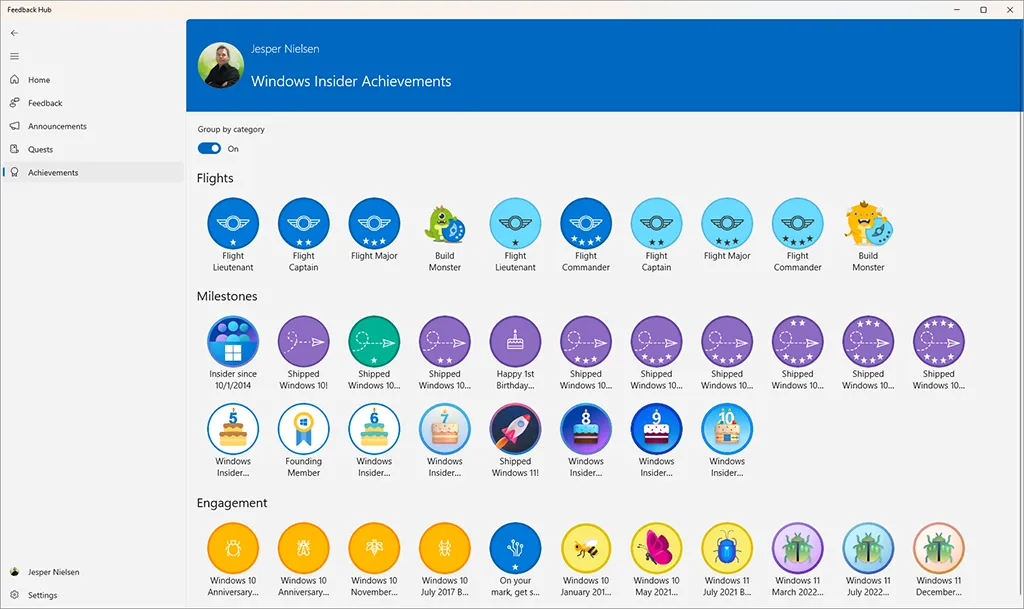
As you participate in the program, you’ll also earn Achievements that showcase your contributions and milestones. From your first feedback submission to completing quests and reaching anniversary milestones, these achievements serve as a fun way to track your Insider journey and celebrate your engagement with the community.
Image viewer
When you submit feedback as an Insider, you’re contributing to a collective voice that Microsoft engineers actively monitor. Many features in Windows today exist because Insiders spoke up and asked for them. Others have been refined and improved based on the real-world testing and feedback that only a diverse community of millions can provide.
There’s something deeply satisfying about using a feature in a released version of Windows and knowing that your feedback helped shape it. It transforms you from a passive user into an active contributor to the platform millions of people use every day.
3. Learn and stay ahead of the curve
Joining the Windows Insider Program is an excellent way to continuously learn and stay up to date with the latest developments in the Windows ecosystem. Microsoft provides extensive resources for Insiders, including detailed flight blog posts that explain new features, email updates, and active social media engagement.
The Windows Insider Blog is a treasure trove of information, offering deep dives into new features, behind-the-scenes insights, and announcements about upcoming changes. By following along, you’ll develop a deeper understanding of Windows architecture, new technologies, and Microsoft’s vision for the platform.
The Windows Insider Program has become my personal learning lab, a place where I can explore, experiment, and expand my knowledge.
For those working in IT, this continuous learning translates directly into professional value. Understanding upcoming features before they’re released gives you a head start on documentation, training materials, and deployment planning.
4. Connect with the community and Microsoft experts
The Windows Insider Program is more than just software previews; it’s a vibrant community of passionate people. As an Insider, you’ll have opportunities to connect with fellow enthusiasts, Microsoft engineers, and the Windows Insider team through various channels.
Whether it’s engaging in community forums, participating in discussions on social media, or attending Microsoft events, you’ll find yourself surrounded by people who share your enthusiasm for technology. These connections can lead to valuable professional relationships, learning opportunities, and friendships.
Microsoft also hosts special events and activities for Insiders, creating unique opportunities to engage directly with the people building Windows. There’s something special about being part of a community that celebrates innovation and discovery together.
5. It’s fun and rewarding
Let’s be honest; being among the first to try new features is simply fun. There’s an excitement that comes with each new build, wondering what improvements or surprises await. The Windows Insider Program transforms the routine of Windows updates into an adventure of discovery.
Beyond the excitement, there’s a genuine sense of reward in contributing to something larger than yourself. Knowing that your participation helps improve Windows for billions of users worldwide gives purpose to your exploration. Every bug you report, every piece of feedback you submit, contributes to making Windows better for everyone.
Celebrating the Windows Insider Program is celebrating a journey of innovation and discovery, and you’re invited to be part of it.
The program also offers different channels to suit your comfort level: the Canary Channel for the earliest and most experimental builds, the Dev Channel for cutting-edge features, the Beta Channel for more polished previews, and the Release Preview Channel for those who want early access with minimal risk.
How to get started
Ready to join the Windows Insider Program? Getting started is straightforward:
Join the program: Visit the Windows Insider Program website and register with your Microsoft account. Membership is free and open to anyone.
Configure your device: Once registered, go to Settings > Windows Update > Windows Insider Program on your Windows device. Link your Microsoft account and choose your preferred channel based on how adventurous you want to be.
Start receiving builds: After selecting a channel, Windows Update will begin delivering Insider Preview Builds to your device. Each build comes with release notes detailing what’s new and what to watch out for.
Explore the resources: Bookmark the Windows Insider Flight Hub to quickly identify the latest builds and access SDK and ISO releases. The Flight Hub is your dashboard for staying current with the program.
Provide feedback: Download and use the Feedback Hub app to share your experiences, report issues, and suggest improvements. Your feedback matters!
For detailed instructions on managing your Insider settings, check out Microsoft’s guide on how to join the Windows Insider Program and manage Insider settings .
Joining with your work or school account
While many people join the Windows Insider Program using a personal Microsoft Account (MSA), you can also register using your work or school account (Microsoft Entra ID). This is particularly valuable for IT professionals and organizations who want to:
- Test in enterprise environments: Evaluate how upcoming Windows features will work with your organization’s infrastructure, policies, and applications.
- Prepare for deployments: Get early access to changes that might affect your deployment strategies and update processes.
- Align with organizational goals: Keep your Insider activities connected to your professional identity and responsibilities.
- Access Windows Insider Program for Business: Organizations can manage Insider builds across multiple devices using Microsoft Intune or Group Policy.
To join with your organizational account, simply select the option to use your work or school account when registering on the Windows Insider Program website or when configuring Insider settings on your device. This flexibility means you can participate as an individual enthusiast, as part of your organization’s IT strategy, or both.
Note
Your organization's IT administrator may have disabled the ability to join the Windows Insider Program using your work or school account. If you're unable to enroll with your organizational account, check with your IT department to see if this option is available in your environment.Explore other Microsoft Insider programs
Besides the Windows Insider Program, Microsoft runs several other Insider programs you can join. Each program gives you early access to features and lets you provide feedback directly to Microsoft. If you enjoy being an Insider for Windows, you might want to explore these additional programs:
| Program | Description | How to join |
|---|---|---|
| Windows Insider Program | Early builds of Windows 10, Windows 11, and Windows Server. | Windows Insider |
| Office Insider Program | Preview new features in Microsoft 365 apps like Word, Excel, PowerPoint, and Outlook. | Office Insider |
| Edge Insider Program | Test upcoming versions of the Microsoft Edge browser across Canary, Dev, and Beta channels. | Edge Insider |
| OneDrive Insider Program | Try experimental features in OneDrive sync client and cloud storage services. | Enable in OneDrive app settings |
| Early App Preview Program | Access pre-release versions of Microsoft apps (like Teams or To Do) to test new functionality. | Enable in individual app settings |
Finding the right Insider program
You might wonder if there’s a single place to manage all your Insider memberships. Microsoft used to maintain a central hub at insider.microsoft.com for all Insider programs, but that portal has since been retired. Today, each program has its own dedicated site, and Microsoft has decentralized Insider enrollment to make each program easier to manage and keep the focus on its unique preview channels.
This means if you want to join multiple Insider programs, you’ll need to visit each product’s dedicated site or enable Insider features directly in the app’s settings. While there’s no longer a “one-click” dashboard for all Insider memberships, the dedicated sites provide more focused experiences and better resources for each specific program.
Why join multiple Insider programs?
Participating in multiple Insider programs amplifies the benefits:
- Early access across the ecosystem: You get to try features months before they roll out publicly, not just in Windows but across Microsoft’s entire product suite.
- Broader influence: Your feedback shapes multiple Microsoft products, giving you a wider impact on the tools you use daily.
- Comprehensive learning: Perfect for IT pros, developers, and power users who want to stay ahead of changes across the Microsoft ecosystem.
- Expanded community: Each Insider program connects you with other testers and Microsoft engineers, broadening your network and learning opportunities.
Whether you focus on Windows alone or dive into multiple programs, being an Insider is about being part of something bigger, helping shape the technology that millions of people rely on every day.
Start your Insider journey
The Windows Insider Program offers a unique opportunity to be part of shaping the future of Windows. Whether you’re driven by curiosity, professional development, or the desire to contribute to something meaningful, the program delivers on all fronts.
To summarize the key benefits:
- Early access to the latest Windows features before general availability
- Direct influence on Windows development through the Feedback Hub
- Continuous learning through detailed resources and insider knowledge
- Community connection with fellow enthusiasts and Microsoft experts
- Fun and fulfillment from being part of an innovative journey
The program is free to join and welcomes everyone from casual enthusiasts to IT professionals. With multiple channels offering different levels of preview builds, you can choose the experience that fits your comfort level and needs.
So, what are you waiting for? Join the Windows Insider Program today and become part of the community that’s helping build the future of Windows.
AI-assisted content disclosure
AI helped create the initial draft of this post. I reviewed, revised, and expanded the content with my own experience, views, links, and references. Even so, parts of the structure or wording may reflect that starting point.
AI supports my writing process, but I remain responsible for the accuracy, fairness, and conclusions of everything I publish. Read my AI transparency statement to learn how I use AI in content creation.
–Jesper
Header image attribution: Windows Insider Program