Windows operating systems have a plethora of built-in tools and commands that make it a versatile platform for both developers and advanced users.
RunDLL32.exe is one of those mysterious Windows components that often leaves users scratching their heads. It’s a legitimate Microsoft utility that allows dynamic link libraries (DLLs) to be executed as if they were standalone applications.
Whether you’re looking to create shortcuts or perform administrative tasks, RunDLL32.exe commands can become an invaluable part of your toolkit.
What is RunDLL32?
RunDLL32, short for Run DLL 32-bit, is a Microsoft Windows utility designed to execute functions within DLLs. DLLs are shared libraries that contain code, data, and resources used by various programs to perform specific tasks. Unlike executable (exe) files, DLLs cannot run independently; they require an intermediary to invoke their functions. This is where RunDLL32 comes in.
Introduced in Windows 95 , RunDLL32.exe is in the System32 directory of Windows installations. It is a native Windows component, meaning it is built into the OS and does not require additional downloads or installations.
How RunDLL32 Works
RunDLL32 works by loading a specified DLL and then calling an entry point (a specific function) within that DLL. It does this through a command-line syntax that specifies the DLL, the function to be called, and any necessary parameters.
The basic syntax for using RunDLL32 is as follows:
RunDLL32.exe 'DLL name','Function name' [Arguments]
- DLL name: The name of the DLL that contains the function you want to execute.
- Function name: The name of the function within the DLL that you want to call.
- Arguments: Any additional parameters required by the function.
Note
There should be no space between the DLL name and the Function name. Any errors will generate message box alerts indicating missing DLLs or functions. It is not possible to report function implementation errors back.
Additionally, please note that Function names are case sensitive.
Common RunDLL32 Commands
Here are some common RunDLL32.exe commands that can be used to perform various tasks in Windows.
One of the most frequent uses of RunDLL32 is to open specific Control Panel applets. For example, to open the Add or Remove Programs applet, you can use the following command:
RunDLL32.exe shell32.dll,Control_RunDLL appwiz.cpl
If you need to quickly access the User Accounts dialog, you can use this command:
RunDLL32.exe netplwiz.dll,UsersRunDll
If you need to adjust the Date and Time settings on your computer, you can use this command:
RunDLL32.exe shell32.dll,Control_RunDLL timedate.cpl
For quickly accessing the Environment Variables dialog, you can use this command:
RunDLL32.exe sysdm.cpl,EditEnvironmentVariables
Creating Shortcuts with RunDLL32 Commands
RunDLL32 commands can also be used to create shortcuts for frequently used functions, and can be particularly useful for administrators or advanced users who need quick access to specific settings or tools.
Create a shortcut to open the “Add or Remove Programs” applet:
- Right-click on the Desktop or in a folder, select
New, and then selectShortcut. - In the “Type the location of the item” field, enter the RunDLL32 command:
RunDLL32.exe shell32.dll,Control_RunDLL appwiz.cpl - Click Next, give your shortcut a name (e.g.,
Add or Remove Programs), and clickFinish.
You now have a shortcut that, when double-clicked, will open the “Add or Remove Programs” applet.
Tip
In some scenarios, you might need to type in the full path in the “Type the location of the item” field, entering the RunDLL32 command:%windir%\System32\RunDLL32.exe %windir%\System32\shell32.dll,Control_RunDLL %windir%\System32\appwiz.cplWindows 10 has approximately 50 different Control Panel applets, each accessible via its respective .cpl file. By leveraging RunDLL32 commands, users can quickly access these applets without navigating through the traditional Control Panel interface.
Exploring RunDLL32 Options
For those who wish to dive deeper into the capabilities of RunDLL32.exe, it’s essential to explore the extensive range of options available. While Windows does not provide a built-in list of all RunDLL32 commands, you can use third-party tools to discover and list these options.
Total PE
Total PE is a great tool that simplifies the process of exploring DLL files and identifying potential RunDLL32 commands. By loading a DLL like shell32.dll, you can delve into the details of the file and examine the list of exported functions.
An improved version of Total PE is available. Screenshots in this post are updated to reflect the new version.
GitHub - zodiacon/TotalPE2: PE Viewer
PE Viewer. Contribute to zodiacon/TotalPE2 development by creating an account on GitHub.
To start, load the desired DLL into Total PE. The tool’s intuitive interface will display a wealth of information, including the list of exported functions. These functions represent the commands that can potentially be called using Rundll32.exe.
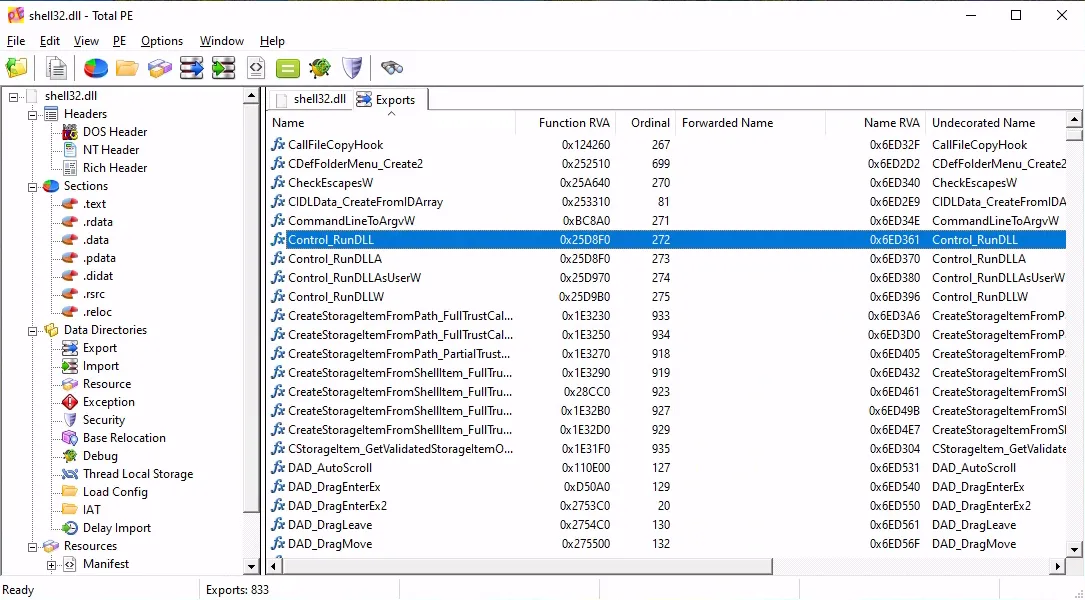
By carefully scrolling through this list, it is possible to identify the relevant functions and understand their respective roles. This method not only aids in uncovering hidden functionalities but also enhances the overall understanding of the DLL’s capabilities.
RunDLL32.exe commands can simplify various tasks, enhancing efficiency and control over the Windows environment. These commands will provide quick access to essential system functions and settings, enabling users to navigate and configure their system with ease.
Finding RunDLL32 Command-lines with Process Monitor
Another great tool to explore RunDLL32 commands is Process Monitor (Procmon) , part of the Sysinternals suite. Process Monitor is an advanced monitoring tool for Windows that shows real-time file system, Registry and process/thread activity.
You can use Procmon to capture RunDLL32 command lines as they are executed by the system or applications.
Download and run Procmon from Microsoft Sysinternals. It immediately begins capturing all system activity, which can be overwhelming without filters.
To add filters, open the Filter dialog by pressing CTRL + L or clicking the filter icon in the toolbar. This is where you define rules to narrow down the flood of events.

Add a Process Name filter In the filter window, set:
- Condition:
Process Name - Relation:
is - Value:
rundll32.exe
Click Add. This ensures Procmon only shows events generated by RunDLL32.
Add an Operation filter Still in the filter window, add another rule:
- Condition:
Operation - Relation:
is - Value:
Process Start
Click Add. This narrows the view to just the moments when RunDLL32 starts a new process.
Click Apply and click OK to apply the filters.
Procmon will display events, where RunDLL32.exe is invoked and the Operation is Process Start. Notice the command line arguments used in the Details column. Each entry will show the command line arguments used, revealing which DLL and function were executed.
By capturing these command lines, you gain insight into:
- System behavior: See which DLLs Windows itself is calling through RunDLL32.
- Troubleshooting: Identify misbehaving or redundant DLL calls that may slow down startup or cause errors.
- Security analysis: Detect suspicious or unauthorized DLLs being launched, a common tactic in malware persistence.
Pro Tips
- Save your filters: Procmon allows you to export filter settings, so you don’t have to recreate them each time.
- Use highlighting: Apply color rules to make RunDLL32 events stand out visually.
- Correlate with timestamps: Match RunDLL32 activity with system events (like logon or app launches) to understand context.
To get deeper into Process Monitor, head over to Windows IT Pro on YouTube, and find loads of great videos on Sysinternals tools, e.g.;
Sysinternals | Fireside Chat - Mark Russinovich
A fantastic fireside chat with Mark Russinovich, co-founder of Sysinternals. A must-watch for anyone interested in Windows internals and troubleshooting.

Sysinternals | Process Monitor deep dive | Sami Laiho
A deep dive into Process Monitor, one of the most powerful tools in the Sysinternals suite. A must-watch for anyone interested in Windows internals and troubleshooting.
Here is a list of commonly used RunDLL32 commands for various tasks in Windows 10.
Click to expandBelow is a comprehensive reference of RunDLL32 commands organized by category.
Categories:
- General
- System Properties
- Display & Personalization
- Sound & Audio
- Network & Connectivity
- Mouse & Input Devices
- Files & Folders
- Programs & Features
- Printers & Devices
- Security & Maintenance
- Date, Time & Region
- Accessibility
- Database & Advanced
- Internet Explorer
General
About Windows
RunDLL32.exe shell32.dll,ShellAbout
Control Panel
RunDLL32.exe shell32.dll,Control_RunDLL
Device Manager
RunDLL32.exe devmgr.dll DeviceManager_Execute
Hibernate or Sleep
RunDLL32.exe powrprof.dll,SetSuspendState 0,1,0
Indexing Options
RunDLL32.exe shell32.dll,Control_RunDLL srchadmin.dll
Lock computer
RunDLL32.exe user32.dll,LockWorkStation
Power Options
RunDLL32.exe shell32.dll,Control_RunDLL powercfg.cpl
System Properties
System Properties - Computer Name tab
RunDLL32.exe shell32.dll,Control_RunDLL Sysdm.cpl,,1
System Properties - Hardware tab
RunDLL32.exe shell32.dll,Control_RunDLL Sysdm.cpl,,2
System Properties - Advanced tab
RunDLL32.exe shell32.dll,Control_RunDLL Sysdm.cpl,,3
System Properties - System Protection tab
RunDLL32.exe shell32.dll,Control_RunDLL Sysdm.cpl,,4
System Properties - Remote tab
RunDLL32.exe shell32.dll,Control_RunDLL Sysdm.cpl,,5
Display & Personalization
Display Settings
RunDLL32.exe shell32.dll,Control_RunDLL desk.cpl
Desktop Icon Settings
RunDLL32.exe shell32.dll,Control_RunDLL desk.cpl,,0
Screen Saver Settings
RunDLL32.exe shell32.dll,Control_RunDLL desk.cpl,,1
Desktop Background / Personalization
RunDLL32.exe shell32.dll,Control_RunDLL desk.cpl,,2
Taskbar Settings
RunDLL32.exe shell32.dll,Options_RunDLL 1
Start Settings
RunDLL32.exe shell32.dll,Options_RunDLL 3
Sound & Audio
Sound - Playback tab
RunDLL32.exe shell32.dll,Control_RunDLL Mmsys.cpl,,0
Sound - Recording tab
RunDLL32.exe shell32.dll,Control_RunDLL Mmsys.cpl,,1
Sound - Sounds tab
RunDLL32.exe shell32.dll,Control_RunDLL Mmsys.cpl,,2
Sound - Communications tab
RunDLL32.exe shell32.dll,Control_RunDLL Mmsys.cpl,,3
Network & Connectivity
Network Connections
RunDLL32.exe shell32.dll,Control_RunDLL ncpa.cpl
Map Network Drive wizard
RunDLL32.exe shell32.dll,SHHelpShortcuts_RunDLL Connect
Set Up a Network wizard
RunDLL32.exe shell32.dll,Control_RunDLL NetSetup.cpl
Mouse & Input Devices
Mouse Properties
RunDLL32.exe shell32.dll,Control_RunDLL main.cpl @0,0
Swap Mouse Buttons (primary to right)
RunDLL32.exe user32.dll,SwapMouseButton
Keyboard Properties
RunDLL32.exe shell32.dll,Control_RunDLL main.cpl @1
Pen and Touch settings
RunDLL32.exe shell32.dll,Control_RunDLL tabletpc.cpl
Game Controllers
RunDLL32.exe shell32.dll,Control_RunDLL joy.cpl
Files & Folders
File Explorer Options - General tab
RunDLL32.exe shell32.dll,Options_RunDLL 0
File Explorer Options - Search tab
RunDLL32.exe shell32.dll,Options_RunDLL 2
File Explorer Options - View tab
RunDLL32.exe shell32.dll,Options_RunDLL 7
Fonts folder
RunDLL32.exe shell32.dll,SHHelpShortcuts_RunDLL FontsFolder
Programs & Features
Programs and Features
RunDLL32.exe shell32.dll,Control_RunDLL appwiz.cpl,,0
Windows Features
RunDLL32.exe shell32.dll,Control_RunDLL appwiz.cpl,,2
Default Programs
RunDLL32.exe shell32.dll,Control_RunDLL appwiz.cpl,,3
Printers & Devices
Add Printer wizard
RunDLL32.exe shell32.dll,SHHelpShortcuts_RunDLL AddPrinter
Add Standard TCP/IP Printer Port wizard
RunDLL32.exe tcpmonui.dll,LocalAddPortUI
Printers folder
RunDLL32.exe shell32.dll,SHHelpShortcuts_RunDLL PrintersFolder
Safely Remove Hardware
RunDLL32.exe shell32.dll,Control_RunDLL HotPlug.dll
Security & Maintenance
Security and Maintenance
RunDLL32.exe shell32.dll,Control_RunDLL wscui.cpl
User Accounts
RunDLL32.exe shell32.dll,Control_RunDLL nusrmgr.cpl
Stored User Names and Passwords
RunDLL32.exe keymgr.dll,KRShowKeyMgr
Windows Firewall
RunDLL32.exe shell32.dll,Control_RunDLL firewall.cpl
Date, Time & Region
Date and Time
RunDLL32.exe shell32.dll,Control_RunDLL timedate.cpl
Date and Time - Additional Clocks tab
RunDLL32.exe shell32.dll,Control_RunDLL timedate.cpl,,1
Region - Formats tab
RunDLL32.exe shell32.dll,Control_RunDLL Intl.cpl,,0
Region - Administrative tab
RunDLL32.exe shell32.dll,Control_RunDLL Intl.cpl,,1
Accessibility
Ease of Access Center
RunDLL32.exe shell32.dll,Control_RunDLL access.cpl
Database & Advanced
ODBC Data Source Administrator
RunDLL32.exe shell32.dll,Control_RunDLL odbccp32.cpl
Internet Explorer
Delete History
RunDLL32.exe InetCpl.cpl,ClearMyTracksByProcess 1
Delete Cookies and website data
RunDLL32.exe InetCpl.cpl,ClearMyTracksByProcess 2
Delete temporary Internet files and website files
RunDLL32.exe InetCpl.cpl,ClearMyTracksByProcess 8
Delete Form Data
RunDLL32.exe InetCpl.cpl,ClearMyTracksByProcess 16
Delete passwords
RunDLL32.exe InetCpl.cpl,ClearMyTracksByProcess 32
Delete all browsing history
RunDLL32.exe InetCpl.cpl,ClearMyTracksByProcess 255
Delete all browsing history and add-ons history
RunDLL32.exe InetCpl.cpl,ClearMyTracksByProcess 4351
Delete Download History
RunDLL32.exe InetCpl.cpl,ClearMyTracksByProcess 16384
Organize Favorites
RunDLL32.exe shdocvw.dll,DoOrganizeFavDlg
Internet Properties - General tab
RunDLL32.exe shell32.dll,Control_RunDLL inetcpl.cpl
Internet Properties - Security tab
RunDLL32.exe shell32.dll,Control_RunDLL inetcpl.cpl,,1
Internet Properties - Privacy tab
RunDLL32.exe shell32.dll,Control_RunDLL inetcpl.cpl,,2
Internet Properties - Content tab
RunDLL32.exe shell32.dll,Control_RunDLL inetcpl.cpl,,3
Internet Properties - Connections tab
RunDLL32.exe shell32.dll,Control_RunDLL inetcpl.cpl,,4
Internet Properties - Programs tab
RunDLL32.exe shell32.dll,Control_RunDLL inetcpl.cpl,,5
Internet Properties - Advanced tab
RunDLL32.exe shell32.dll,Control_RunDLL inetcpl.cpl,,6
Understanding Control Panel Applets
Control Panel applets are stored as .cpl files in the System32 directory. Each .cpl file corresponds to a specific Control Panel item, such as appwiz.cpl for Add or Remove Programs or desk.cpl for Display Settings.
When using RunDLL32.exe to open a Control Panel applet, you typically specify the .cpl file along with the appropriate function to invoke the desired settings interface, typically in the following format:
RunDLL32.exe shell32.dll,Control_RunDLL [file].cpl,,[arguments]
Security Considerations
While RunDLL32.exe is a powerful tool, it also comes with potential security risks. Because it can execute code within DLLs, it may be exploited by malicious software to run harmful functions.
Therefore, it’s crucial to only use RunDLL32.exe commands from trusted sources and to ensure that your system is protected by up-to-date Endpoiont Security software.
Final Thoughts
RunDLL32.exe is a versatile command-line utility that provides advanced users and administrators with a way to directly invoke functions within DLLs. From opening Control Panel applets to setting up shortcuts for common tasks, RunDLL32.exe commands can save time and enhance productivity.
However, it is important to use these commands responsibly and be aware of the potential security implications.
By understanding and leveraging RunDLL32.exe commands, you can unlock new levels of control and efficiency within the Windows operating system. Whether you’re customizing your workflow or managing system settings, RunDLL32.exe is a powerful tool that is well worth exploring.
–Jesper